Monday, 22 February 2016

Monday, 1 February 2016
Evaluation Question 4. How did you use media technologies in the construction and research, planning and evaluation stages?
During the research
and planning stages I used a number of different programmes and websites
RESEARCH & PLANNING {SOCIAL MEDIA}
- Whatsapp,
SurveyMonkey & iMessage
Throughout
the research and planning process of my music video and ancillary texts, I was
able to conduct most of research data through social media such as Whatsapp and
iMessage. Using Whatsapp and iMessage, I was able to ask a wider range of
people for their opinions, both qualitative and quantitative replies. What I
liked about using Whatsapp was that people could send their replies in text
format as well as audio. I was also able to use SurveyMonkey, a questionnaire
creation website, upload my questionnaire onto this website and then use
Whatsapp amongst other social media format to send the link to people to
answer.


- Instagram
When it came
to planning the mise-en-scene for my artist, I tried to link in the current
trends in today’s society as well as Hip Hop/R&B industry conventions. I
found out that in most Hip Hop/R&B music videos, artist commonly wore
streetwear cloths, and so I was able to include ‘#streetwear’ into the search
engine on Instagram. Instagram then gave me up to date result as to what people
typically like as streetwear. Through this research conducted on Instagram, I
was then able to plan an outfit which I thought would be suitable for both the
audience’s reference as well as Hip Hop/R&B mise-en-scene conventions.

 Although it
was a huge part of my research and planning process, I was able to animated
presentations as well as gifs of certain pictures I had taken in order to try
and present my ideas clearer. For example for my first idea of my digipak
panel, I wanted to try and use the motion blur as inspiration and interpret
this effect. However I wasn’t able to explain it as much as I could and so I
decided to create a Gifs to illustrate my idea.
Although it
was a huge part of my research and planning process, I was able to animated
presentations as well as gifs of certain pictures I had taken in order to try
and present my ideas clearer. For example for my first idea of my digipak
panel, I wanted to try and use the motion blur as inspiration and interpret
this effect. However I wasn’t able to explain it as much as I could and so I
decided to create a Gifs to illustrate my idea.


 The most
basic and obvious media platform which I mainly used to conduct most of my
research would be Google. Through the use of Google, I was able o find a range
of website in which to help me. This included the many theories of music
videos, as well as previous research on R&B/Hip Hop media products.
The most
basic and obvious media platform which I mainly used to conduct most of my
research would be Google. Through the use of Google, I was able o find a range
of website in which to help me. This included the many theories of music
videos, as well as previous research on R&B/Hip Hop media products.
 Whilst
filming my music video I decided to use my iPhone, the reason for this was I
was thinking in the long term. Since after I thought I had filmed everything
that was needed for my music video, I had to refill some
scenes as well as the environment where I had filmed the music video at least
twice. Using my iPhone, allowed me to have full access to the camera at all
times.
Whilst
filming my music video I decided to use my iPhone, the reason for this was I
was thinking in the long term. Since after I thought I had filmed everything
that was needed for my music video, I had to refill some
scenes as well as the environment where I had filmed the music video at least
twice. Using my iPhone, allowed me to have full access to the camera at all
times.
- Blogger
Blogger was
the main media platform with I had used to collect and keep all of my research
and planning in one place. Using blogger I was able to constantly go back on
previous posts, and continue with my ideas. The main ways in which I used
Blogger, was by creating the titles in which I wanted the posts to go under.
This then gave me an idea and guideline as to what I had to do next in terms of
further research and planning.

- Animated
Presentations & Gifs
 Although it
was a huge part of my research and planning process, I was able to animated
presentations as well as gifs of certain pictures I had taken in order to try
and present my ideas clearer. For example for my first idea of my digipak
panel, I wanted to try and use the motion blur as inspiration and interpret
this effect. However I wasn’t able to explain it as much as I could and so I
decided to create a Gifs to illustrate my idea.
Although it
was a huge part of my research and planning process, I was able to animated
presentations as well as gifs of certain pictures I had taken in order to try
and present my ideas clearer. For example for my first idea of my digipak
panel, I wanted to try and use the motion blur as inspiration and interpret
this effect. However I wasn’t able to explain it as much as I could and so I
decided to create a Gifs to illustrate my idea.
- Google
& YouTube

 The most
basic and obvious media platform which I mainly used to conduct most of my
research would be Google. Through the use of Google, I was able o find a range
of website in which to help me. This included the many theories of music
videos, as well as previous research on R&B/Hip Hop media products.
The most
basic and obvious media platform which I mainly used to conduct most of my
research would be Google. Through the use of Google, I was able o find a range
of website in which to help me. This included the many theories of music
videos, as well as previous research on R&B/Hip Hop media products.
During the
constructions stages I was also able to use a range of technologies and
equipment
CONSTRUCTION
- iPhone
& Selfie Stick
 Whilst
filming my music video I decided to use my iPhone, the reason for this was I
was thinking in the long term. Since after I thought I had filmed everything
that was needed for my music video, I had to refill some
scenes as well as the environment where I had filmed the music video at least
twice. Using my iPhone, allowed me to have full access to the camera at all
times.
Whilst
filming my music video I decided to use my iPhone, the reason for this was I
was thinking in the long term. Since after I thought I had filmed everything
that was needed for my music video, I had to refill some
scenes as well as the environment where I had filmed the music video at least
twice. Using my iPhone, allowed me to have full access to the camera at all
times.
iMovie
& Adobe Premiere
In order to create the music video as well as the ancillary texts I had to produce. From using these two types of media technologies I was able to see exactly where certain clips of y music video was as well as the different transitions that I would be able to use.
In order to create the music video as well as the ancillary texts I had to produce. From using these two types of media technologies I was able to see exactly where certain clips of y music video was as well as the different transitions that I would be able to use.

- Screen
Recorder {APPLE MAC}, YouTube {WEB 2.0}
Using the
screen recorder on my apple Mac, I was able to recorder certain editing filters
or even how I was able to blur the inside of the digipak panel for future help
to me. Along with the use of Web 2.0 sites such as YouTube, I would then be
able to sometimes upload the screen records and then insert a voice over. From
there I could create a video show the construction path of my final music
video, promotional poster and digipak.
Photoshop

 Being able to
use the digital photo manipulation helped me greatly. A clear example of this
would be when i decided to make changes to the background of my Promotional
Poster. I was then able to insert the 2 backgrounds onto Photoshop and was
giving the tolls to cut out certain areas which I didn’t want. When it came to
choosing a simple san serif font for most of the text seen on the digipack and promotional
poster, I was told that Photoshop had many. This therefore allowed me to also
use this software for its text fonts that are available.
Being able to
use the digital photo manipulation helped me greatly. A clear example of this
would be when i decided to make changes to the background of my Promotional
Poster. I was then able to insert the 2 backgrounds onto Photoshop and was
giving the tolls to cut out certain areas which I didn’t want. When it came to
choosing a simple san serif font for most of the text seen on the digipack and promotional
poster, I was told that Photoshop had many. This therefore allowed me to also
use this software for its text fonts that are available.
To present my evaluation,
I also decided to use many media platforms
In order to
make my evaluation questions appealing and attractive I decided to use
different media presentation platforms for each question. I thought this would
not only show that I am able to use a range of media platforms, but also allow
me to demonstrate my knowledge of how effective media can be when trying to
present any piece of work.
Sunday, 31 January 2016


Addition to Poster Text
Addition to Poster Text

 In order to make the promotional poster
as informative as possible, I decided to add some contact information along the
bottom of the poster, still using the same font choice throughout the poster to
show continuity. As well as promoting the artist’s hit single on the
promotional poster. I realised that some promotional posters use this
convention, since some of the audience may only know a particular artist from
one of their major songs and so by promoting the album through hit singles
could attract more of the target audience to listen to the full album. Some of
the other typical conventions that I included in terms of text would be the release
date, the artist’s name, and the album’s title on top of the type of album
being promoted.
In order to make the promotional poster
as informative as possible, I decided to add some contact information along the
bottom of the poster, still using the same font choice throughout the poster to
show continuity. As well as promoting the artist’s hit single on the
promotional poster. I realised that some promotional posters use this
convention, since some of the audience may only know a particular artist from
one of their major songs and so by promoting the album through hit singles
could attract more of the target audience to listen to the full album. Some of
the other typical conventions that I included in terms of text would be the release
date, the artist’s name, and the album’s title on top of the type of album
being promoted.
Saturday, 30 January 2016

Friday, 29 January 2016
Bending CD Text
Bending CD text
 For the CD cover,
I only want text to be visible and so I want to try and shape the text to fit
the curve of the CD’s edges. In order to do so I had to use the pen tool after copying
the artist’s name onto the CD as another layer. I was then able to use the
bending tool at the top and change the text’s shape according to circle appearing
around the text. Although for the album’s title I want to have the right in the
same font as the back cover also straight. I think that having all the text on
the CD beginning round in a circle wouldn’t appear as professional and wouldn’t
suit the genre of the album.
For the CD cover,
I only want text to be visible and so I want to try and shape the text to fit
the curve of the CD’s edges. In order to do so I had to use the pen tool after copying
the artist’s name onto the CD as another layer. I was then able to use the
bending tool at the top and change the text’s shape according to circle appearing
around the text. Although for the album’s title I want to have the right in the
same font as the back cover also straight. I think that having all the text on
the CD beginning round in a circle wouldn’t appear as professional and wouldn’t
suit the genre of the album. Changing Poster Image
Changing Image on Promotional Poster
In order to
add the artist to the background I had to use the Lasso tool and crop out the artists.
I then refined the edges in order to reduce the harsh edges around her. After
this I intend to then cut out the artist in the image with the trees and basketball
as her background.
I'll then be
able to copy and paste using the stomp tool to blend the background where the
gap between the artist and the edges cit out from the original artist, are too
far apart.
Thursday, 28 January 2016
CD Cover Idea
CD Cover Ideas
I wanted to keep the CD itself
simple. I thought that this wouldn’t only add to the diverse image of a young
and individual artist, but also help to prove that she is diverse compared to other
artist in the industry. Using just her name and the album’s title, I thought
that this would allow the audience to connote a strong statement from the
artist.
Although I couldn’t find examples,
I personally thought that simple CD covers make more of a statement rather that
covering the CD with the artist’s face as well as on the front cover. I thought
that would make the digipak too much album the artist rather than her music,
and so I wasn’t too interested in using another image on the artist again.
Wednesday, 27 January 2016
Inside Panel Text
Trying to use as many of the typical
R&B/Hip Hop conventions, I was confused as to what I should include on the
inside of my digipak. I then thought of what artists within these types of
music industries rap and sing about, and so I came to the conclusion of putting
a message from the artist on the inside.

As most
artists rap and sing about their struggles as a child, as a neighbourhood or
even as a race, I wanted my artists to also be reflected as someone who
appreciates where they’re from along with the struggle she went through. Using
this message I would hope to create a positive image of the artist for the
audience. A young girl who is proud of where she’s come from knowing that she
had to work hard. From this I have tried to also challenge the theory of Laura
Mulvey, the Male Gaze.
 Representing ‘Tyla’, as a strong
independent young girl, through the artist message I hope to attract more of
the female side of her audience. Thos would allow the females to work harder at
trying to improve and better themselves for themselves, rather than working on
ways to improve themselves for the ‘male gaze’.
Representing ‘Tyla’, as a strong
independent young girl, through the artist message I hope to attract more of
the female side of her audience. Thos would allow the females to work harder at
trying to improve and better themselves for themselves, rather than working on
ways to improve themselves for the ‘male gaze’.Tuesday, 26 January 2016
Monday, 25 January 2016
Focus Group on Back Cover Progress
Focus Group on Back Cover Progress
After carrying out a short focus
group on the appearance of my back cover, most people had approved of the look.
Most comments were directed at the blurring effect on the image. The reason for
which I had done this was to make sure that the text was visible and clear for
the audience to read. However some had said that the first two song titles of
the digipak are a bit unclear as the sky’s colour blends in with the text
colour. For this I decided to get rid of two song titles and then move the
whole text downwards.


Thursday, 21 January 2016
Changes to my Digipak Photos
Changes to my digipak photo
What I hadn't realised about the insides of my digipak, was
that there are only two sides and not three. This therefore caused me to
rethink about the blurry movement effect I had originally decided to go with.
This is because; I not only thought that this would appear too technical for the
genre of my album but also because the effect would appear squashed on just one
side of the digipak. Although I will not need to retake pictures for the inside,
I will have to choose from the photos I have recently taken.
Inside Digipak Image
Inside Digipak Image
 After
choosing the pictures I wanted to edit, I had come up with the idea of merging
some of the images together. Whilst taking some pictures I was able to use the shutter
effect, which allowed me to take several images at the same time. This therefore
gave me several images following the as artists moving.
After
choosing the pictures I wanted to edit, I had come up with the idea of merging
some of the images together. Whilst taking some pictures I was able to use the shutter
effect, which allowed me to take several images at the same time. This therefore
gave me several images following the as artists moving. 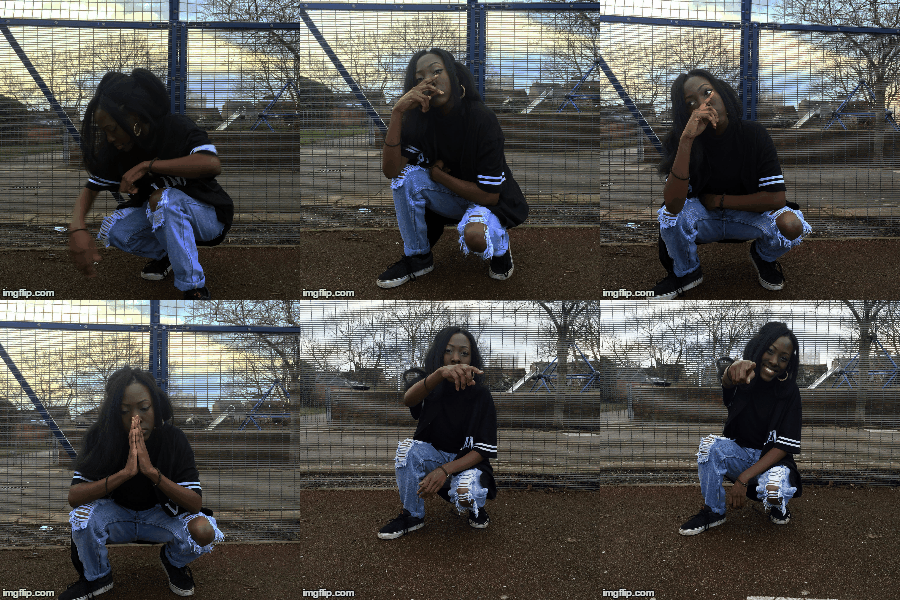
I then searched on the internet and found an image similar to the effect I wanted to create on Photoshop. Similar to the effect of the ballerina dancing in this image, however not as close together since the images that I took of the artist, her feet are in different positions.

Tuesday, 19 January 2016
Monday, 18 January 2016
Digipak Plan
Digipak Plan
 Now
that I have designed my digipak plan, I decided to create a quick
plan in which I will be using the same measurements. In terms of the
order in which I will be creating each side of my digipak, the first will
be the front cover. This is because the front cover is the most
important, I think. It’s the first thing which
the audience will see as well also being a guide as to
which effects I should use on the rest of the images I will
be using to create consistency.
Now
that I have designed my digipak plan, I decided to create a quick
plan in which I will be using the same measurements. In terms of the
order in which I will be creating each side of my digipak, the first will
be the front cover. This is because the front cover is the most
important, I think. It’s the first thing which
the audience will see as well also being a guide as to
which effects I should use on the rest of the images I will
be using to create consistency. Sunday, 17 January 2016
Wednesday, 6 January 2016
Digipak Information
Digipak Information
Artist’s Name: Tyla
Album Name: One and Only
Hit Single of Album: Unconditional
Song Name
1. Intro
2. From
The Bottom
3. I
got Mine
4. Cloud
9
5. Love
Anyway
6. Unconditional
7. Jealousy
8. Preach
9. Love
in The Summer
10. The 9ine
11. Raw & True
12. My Way
Tuesday, 5 January 2016
Saturday, 2 January 2016
Ideal location for Ancillary Tasks
I noticed that instead of looking for a completely different
location to take the both magazine and digipak pictures, it is possible to take
these pictures in the same location used for the digipak and the music video. I
find this was the audience will find it easier to relate each media to one
another, along with them being to notice quickly that all three are by the same
artist.
Evidence of this would be Rihanna’s music video ‘Only Girl’.
Her magazine advert and digipak were all taken in the same location, as well as
the digipak and magazine advert having the same mages of the artist. This also
allows there to be a flow with all sides of the digipak, along with giving the
artist the chance to emphasise more of the album’s genre.

 Knowing this I have decided to use the last location of my music video for the digipak and the magazine advert. I’m not sure yet which parts of the basketball court I’ll be using yet, in terms of the stars of the court, the metal fence or the actual hoop in the background. Although I think using the basketball court’s fence or brick wall would be a nice background to use for the digipak, as most digipak that promote albums within the R&B/Hip Hop industry do use brick wall and metal fences typically covered in graffiti.
Subscribe to:
Comments (Atom)